Open top menu
Showing posts with label Long Exposure. Show all posts
13 Nov 2013
Car Light Trails

Need some photography ideas for night? Try shooting some creative light trails of cars using just a camera and tripod. The whole idea behind this is to take long exposure shots of moving cars where the head light and tail lights of moving cars will form light trails on the camera sensor.
EXIF: ISO100 and F/11 at 10 secs (0 EV).

Locations

Typically, light trails of moving cars are taken from a high-level ground (e.g. bridge or from apartment which has a nice street traffic view) where a long stretch road with unobstructed traffic can be seen. The effects would be exceptionally nice if the roads are full of turns and bends.

However, shooting car light trails at ground level view e.g. traffic junctions, could also produce very interesting results with the lights of cars turning in different directions. Do bear careful to observe the traffic if taking near roadside.

Camera Settings

There is no one fixed settings for taking car light trails as it depends on the ambient lighting condition on the roads, so the settings would have to be adjusted accordingly to match the scene ... basically trial and error. Here are a few pointers though:
  • Use low ISO 100 to reduce as much noise from the shadows and long exposure.
  • An exposure time of 10 secs to 15 secs should be sufficient to capture beautiful light trails of cars. A longer exposure time may wash out the light trails and ended up with thick bands of lights which may not look nice (see photograph below which is shot with a longer exposure compared to the 1st photograph). Once again, it depends on the amount of traffic on the roads.
EXIF: ISO100 and F/16 at 30 secs (0 EV)
  • The aperture should be compensated accordingly for the amount of exposure time that will be used. Use the camera's metering to determine the amount of aperture to use. An small aperture of F/8 or higher would be better for a good enough depth of field.
  • Switch to manual focus, and focus halfway down the road or on something which you want it to be captured visually strong in your frame.
  • Shoot in RAW to allow more control over white balance, exposure, etc. Do note that street lights and car lights does produce a orange cast in the photographs taken.
  • Taking car light trails during twilight hours (i.e. when the sun is just about to set) could produced a nice picture with a natural atmospheric ambience light with artificial light trails from cars.

Try Creating a Traffic 'Heat Map'

To create a traffic 'heat map' showing frequency of traffic (i.e. see 1st picture above), I had stacked 6 photographs of the same scene taken with different car light trails and blend them using 'Difference' blending mode in Photoshop to produce an array of colored car light trails. Follow the following steps using Photoshop:
  • From Photoshop, select Files --> Scripts --> Load Files Into Stack ...
  • Select all the car light trail photographs taken from the same scene and click 'OK'. 
  • Once all the photographs are loaded into stack which you can see each photograph as a layer, you will need to change the Blending Mode for each layer to 'Difference'.
  • Merge all the layers into one and you have the traffic 'heat map'.

Please visit http://jefzlim.smugmug.com/Themes/Light-Trails for the higher resolution photos ...


Read more
9 Nov 2013
Chasing Stars ... Trails

I have been chasing stars for the past one month. Not movie stars but stars in the sky.

Many had wondered whether shooting star trails in a bright island like Singapore is possible. Not only that, our skies are usually cloudy and rarely clear. Despite these adverse conditions, shooting star trails is definitely possible in Singapore.

Shooting star trails has never been easy in the month of October and November when the weather is usually wet and the sky is always cloudy. Whenever there is an opportunity of good weather at night, I would get out of the home and try out at various locations/timings with different camera settings.
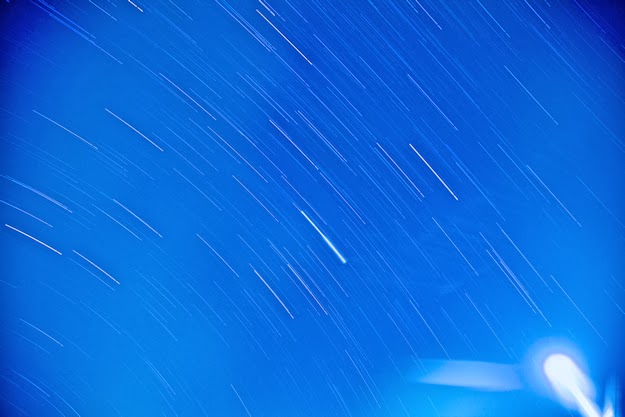
Star trail taken at Sentul Crescent. 121 photographs stacked (ISO 100, F/4, 30 secs). 

Based on my research and experience so far, I've put together a list of recommendations on how to take star trails in Singapore to help any enthusiast who would like to do so.

Equipment Needed

Camera

Camera that is capable of shooting in long exposure.

Fast Lenses

Fast lenses with wide aperture (i.e. smallest F-number that you can get). It does not matter whether it is a wide-angle lens or zoom lens as it only affects your field of view. However, you may want to take note that using a lens with longer focal length can capture a longer trail given the same amount of time as captured with a shorter focal length.

Tripod

As the star trail is shot on long exposure over a rather long period of time, a steady tripod would be required. If shooting in the open, additional weights to weight down the tripod may be required to reduce potential shakes on camera caused by strong wind (if any).

Remote Trigger

Wired remote trigger that is capable of locking the shutter press. This is necessary as multiple long exposure photographs will be taken in continuous shooting mode over a long period of time. Alternatively an intervalometer should be used if you intend to have exposure of each photograph longer than 30 seconds.

Star trail taken at Sentul Crescent. 135 photographs stacked (ISO 400, F/4, 30 secs). 

Techniques, Camera Settings and Parameters

Capturing star trails requires long exposure of 30 seconds or longer. In a bright island like Singapore, there are 2 problems that one would face while trying to capture star trails. 
  • First, the stars are barely visible to our eyes. Fact is that there are many stars which is not visible to our naked eye but can be captured on the sensitive camera sensor over time. The settings on the camera needs to be sensitive enough to pick up the stars which is least bright in the sky.
  • Second, a very long exposure could easily wash out the picture as our skies are bright. Hence it is difficult but important to make the balance of having sensitive enough settings and yet not over-exposing the picture taken.

Shoot In JPEG Instead of RAW

The entire technique will require taking multiple long exposure shot over time, and stacking the photographs together to show the star trail. Hence shooting in JPEG will give a smaller file size which take up less space and less resource intensive on your computer during the stacking time.

Aperture

The aperture need to be as wide open as possible with the smallest F-number used. This will enable more light to be taken in onto the sensor so that even the least bright star can be captured.

Exposure Time

An exposure time of 30 seconds is recommended for each photograph. This will enable a sufficient trail of the star to be captured, and a duration of 15mins with 30 seconds exposure interval should give you quite a fair bit of star trails. The other reason for 30 seconds is that the camera does not need to go into bulb mode, where continuous shooting will require require an intervalometer.

Note: The longer the exposure, the longer the star trail. To have a hyper long exposure in a single shoot without the picture being washed out would mean that aperture needs to be as small as possible and ISO as low as possible, which does not work out in our bright sky. Based on my experiments (see picture below), a single exposure of 10 mins does not pick up as many star trails as compared to 40 exposures of 30 secs.
Star trail taken at Riverside Walk. Single long exposure ISO 100, F/4, 600 secs). 

ISO

This is a tricky setting that needs to be balanced. Although the sensor needs to be as sensitive to light as possible, high ISO will introduce more noise to the picture taken, not to mention even more noise from long exposure.

With the aperture wide-open and high ISO used, the exposure time may be too short to capture a proper length of the star trail. Based on my experiments so far, an ISO of 400 is about right without over-exposing the picture and yet sensitive enough to pick up the light from the stars.

Continuous Drive/Shooting Mode

The camera needs to be continuous shooting over the entire period of time (e.g. 1 hour of 30 seconds exposure for each photograph). In order not to have "breaks" in between due to the camera processing the photograph after 30 seconds, you will need a wired remote trigger that is capable of locking the shutter press throughout the entire period.

White Balance Set to Tungsten

If taking pictures in JPEG (even if you are not), it is best to set the white balance to tungsten. Believe it or not, our bright skies are "lighted" with the city lights which are of yellowish/orange tint. Setting to Tungsten will make your sky more 'blue'.

Take Test Shots

While adjusting your settings and taking test shot, I strongly suggest that ISO should be the parameter to be first varied with when required i.e. if the picture is over-exposed with the widest aperture over 30 seconds, then stop-down the ISO.

The star trails will not be visible on the LCD display of the camera. You will need to zoom in 100% on the LCD display to see the little trails. This is a good way to see if the sky is too cloudy for capturing star trails.

Understanding Directions of Star Trails

Semi-Circular Star Trail Patterns at True North/South Pole

Stars will have a semi-circular trail if pointing at True North or South Pole. Singapore is located near the equator with a latitude of about 1°. This means that we will never get a full circular star trail. The best we can get is a semi-circle star trail pointing at True North, and slightly less than a semi-circle star trail pointing at True South.

It is important to note that True North/South is different from the Magnetic North/South which is our typical compass. The angle of difference between True and Magnetic North/South is known as the magnetic declination which can be computed at http://www.ngdc.noaa.gov/geomag-web/#declination. Please note that magnetic declination does vary over time.

Therefore, if you want a circular star trail, simply point towards the Magnetic North/South as indicated in your magnetic compass and offset it by the amount of magnetic declination. At the time of writing this article, the magnetic declination is 0° 13' 3"East i.e. Magnetic North is 0° 13' 3" east of True North (and similar computation for South).

Stars has an anti-clockwise trail when pointing towards True North, and clockwise trail in the True South. Based on my research and observation, the stars will take at least 6-8 hours to move across the horizons from left to right.

Vertical Star Trail Patterns at East or West

If you are pointing towards East or West, the star trails will appear vertical in your picture frame. If your lens is wide enough, the star trails on the extreme left of your picture frame will appear to bend towards the top left edge while the star trails on the extreme right of your picture frame will appear to bend towards the top right edge.

The star trail will look something like the following if taken pointing towards NorthEast direction.
Star trail taken at Punggol Drive. 67 photographs stacked (ISO 400, F/4, 30 secs). 

Stacking Your Star Trails Photographs

Once all your photographs have been taken, you will need to stack them in Photoshop so that the star trail will appear in a single photograph. The following are the keys steps to stack them using Photoshop:
  • From Photoshop, select Files --> Scripts --> Load Files Into Stack ...
  • Select all the star trail photographs that you have taken and click 'OK'. This process will take relatively long time to complete depending on the number of photographs you have and system resources (i.e. CPU speed, memory, etc.)
  • Once all the photographs are loaded into stack which you can see each photograph as a layer, you will need to change the Blending Mode for each layer to 'Lighten'. As the layers are blended and lighten, the star trail will appear.
  • Merge all the layers into one and you have your star trail picture.
Note: I'm not providing a detailed instruction here as there are many resources in the Internet that you can googled which will show you how to. 

Other Things to Note

  • Avoid taking star trails in extremely "early hours" in the night e.g. beyond 1am. This is because the weather will turn cold and dew will start to condense on the surface of your lens which will ruin your shots.
  • Please be extremely careful if you are going to a location which is dark and deserted. You definitely do not want anything to happen such as robbery or bitten by wild dogs, etc.
Star trail taken at Sentul Crescent. 46 photographs stacked (ISO 200, F/4, 30 secs). 

Please visit http://jefzlim.smugmug.com/Themes/Star-Trails to see the higher resolution and full size image of the star trails that I've taken.


Read more
21 Oct 2013
Zooming Light Burst Effects

Night photography in a small city like Singapore has one advantage, which is the abundant amount of difference light sources around us at night (e.g. street lights, traffic lights, building lights, lighted sign-boards, etc.) that will allow creative zooming light burst effects to be created.
Following my post on the night cityscape of Singapore yesterday, I've actually tried out zooming light burst effect of the cityscape and it turned out to be amazingly creative.

Equipment and Setup

The equipment and setup is no different from taking a night cityscape shot as shared in my post yesterday. However, a zoom lens is definitely needed. In my case, I've used my EOS EF24-105mm F/4L IS USM lens to create the zooming light burst effects.

How to Create the Zooming Light Burst Effect

The zooming light burst effect is created by the manual zooming of the lens when the shutter opens for the duration of the exposure. Here are some consideration factors when trying it out:

Smooth Zooming

Zooming in or out create different perspective and effects. Whichever the case, you need to practice on a smooth zoom i.e. meaning turning the zoom lens at a constant speed. If the zooming is not smooth, the picture may end up with jerky light trails that may not look nice.

It may be difficult to maintain a smooth zoom if you have a zoom lens with wide focal length (e.g. 18-200mm) that require turning the lens barrel for almost a full round. So in this case, you don't have to zoom all the way - work on a more comfortable focal length range where a smooth zoom can be maintained.

Pause and Hold the Zoom

The camera will collect more light when a pause is made at any point of the zooming (e.g. at the start of the zoom, halfway during the zoom or end of the zoom), making the light burst at the point of zoom appears stronger in the picture taken.

For example in the picture below, I took a 1 second pause at the end of my zoom which will allow more lights to be collected at that point, thus making the cabin from Singapore Flyer more visible.

Where possible, try to avoid camera shake during the zooming process. You do not have to rush through the zoom, a smooth and steady zoom is better. If there is camera shake, you may end up with jerky light trails and the background picture may not be sharp.

Aperture and Exposure Time Required

I typically work on the exposure time required which is made up of the time needed for a smooth zooming and the pause time required - in my case, 2 seconds for the zooming action plus 1 second for the pause at the end.

Knowing that my exposure time, I switch to Shutter Priority (Tv mode) and let the camera meters the aperture needed at for a 3 seconds exposure @ ISO-100. If the camera cannot meter the aperture because a wider aperture beyond what the camera can handle is needed (i.e. you see the aperture value blinking), I will then step up the ISO to a value that can be metered by the camera.

This will gauge my starting point for further adjustment which in my case, the camera metered a value of F/4 for a 3 seconds exposure @ ISO-400.

Fire Flash to Freeze Part of the Image

You can also try out firing a flash during the exposure time to freeze part of the image along with the light burst. For example, you are trying to create a zooming light burst effects on the lightings of a Christmas tree with a person next to it and you also want to capture the person vividly along with the light burst, you can fire a flash to "freeze" the person in your picture while zooming.

Note: This technique can also be tried in broad daylight, not necessary only at night with light sources.


Go try it, it's fun!


Visit http://jefzlim.smugmug.com/Destinations/Singapore/Bay-East-Garden for the higher resolution pictures ...


Read more
20 Oct 2013
Night Cityscape of Singapore @ Bay East Garden

Insomnia has returned to haunt me over the past few nights, and so I have been going out in wee hours for night photography - hopefully getting me tired enough to sleep.

I never had taken photographs of Singapore night cityscape. So I visited the Bay East Garden, first time ever since it was built. It was a big park, and too dark at night to appreciate the beautiful park (perhaps I should come back again during the day). However, I was thrilled by the excellent lighting of the cityscape view over the Kallang River although could have been better without a gloomy-looking sky.

I have prepared some tips as reference point for anyone new to long exposure night photography.

Survey the Environment Before Setting Up the Equipment

I typically do not jump to set up and take my shots when it comes to landscape or cityscape, cause they are not going to go away any moment. I would always walk around and survey the environment before deciding on the best spot for the composition that I want.

Essential Equipment/Accessories

Tripod

Needless to say, tripod is the fundamental needed accessories for long exposure shot. If strong wind is expected (e.g. taking Hong Kong cityscape from The Peak), additional weights such as sand bags or a heavy bag, would be needed to weigh down and secure the tripod to prevent shakes of the camera caused by the strong wind that could ruin the long exposure shot.

Remote Trigger

Important to minimise shake caused by pressing the shutter release, and definitely essential if shooting on Bulb mode with exposure longer than 30 seconds. If a wired remote is used, the remote should have a trigger lock feature so that you don't have to press and hold the trigger for the amount exposure time exposed. For wireless remote trigger, it should have a timer release so that the amount of exposure time can be set.

Wide Angle Prime Lens (Preferred)

Prime lens are ideal for night landscape photography as they typically have lesser number optical elements within the lens to prevent potential lens flare caused by bright light source from street light and buildings. Wide angle lens (35mm or less) provide a greater field of view for your landscape - zoom lens can also be used but it means lesser field of view.

Timer/Stop-Watch 

For long exposure shots, I always use the stop-watch function on my mobile phone as it it probably too dark to see the timer display on the camera itself. Even if the camera has a feature to light up the LCD panel display, it is recommended not to use it during exposure time, as pressing the button to activate the light may introduce shakes to the camera.

Settings on Camera

Turn On Long Exposure Noise Reduction and Use Low ISO

Long exposure can introduce quite a fair bit of noise to the pictures taken. Access the camera menu and settings to turn on long exposure noise reduction. Also, to counter the potential noise from long exposure, ISO should be set to the lowest (i.e. 100).

Use Bulb Mode with Remote Trigger

For long exposure shot, I typically use bulb mode to control the amount of exposure time that I require. In bulb mode, I always use a remote trigger as I do not want to have any potential shakes caused by the need to press on the shutter release on the camera.

Turn On Mirror Lockup and Use Self-Timer

Each time when the shutter is pressed, the camera will flip-up the mirror and open the shutter. The mirror flip-up action may cause unnecessary vibrations on the camera. So to reduce this, I always turn on mirror lockup for long exposure, and set my trigger on a 2 seconds self-timer release. This means that the moment the remote trigger is pressed, the mirror will be flipped up and after 2 secs, the shutter opens.

Note: Mirror lockup option can be accessed from the camera menu/settings option.

Shoot in RAW

I always shoot in RAW format as it allows me better control over my editing during post-processing. RAW allows greater non-destructive editing such as adjust white balance, sharpening and noise control, and to better recovery of images that could be over or under exposed.

Set Auto-White Balance (AWB) to Tungsten (~3200K)

Long exposure night shot of cityscape will typically turn out to be "orange" in color. This is caused by color cast of street and building lights. By setting the AWB to Tungsten (typically around 3200K), the lighting in the picture will look more "correct and normal". Although I can correct this in my RAW during post-processing, I still set it to Tungsten.

Use Small Aperture (i.e. Big F-Number)

Typically a small aperture starting from F11 or higher to maximize the depth of field (DOF) when photo-taking cityscape or landscape. Personally I do not encourage going beyond F20 as the sharpness of the picture may end up too "soft"due to severe diffraction of lights passing through too small an aperture.

Having said that, the primary consideration on the aperture to use should be how far the subject is. If the subject is really far-far-away (e.g. shooting a mountain), then it does not matter what aperture is used as the full depth-of-field can be achieved. There is also a need to consider hyperfocusing distance if there is a subject much nearer to you in the foreground that you want to capture it in the picture.

In this particular case, the cityscape buildings are probably about 1-2 km away from where I stand, separated by the Kallang River (i.e. no foreground object that I want in my picture) - so, I've used an aperture of F16-F20 for most of my shots.

Taking the Shot

Gauge Exposure Time by Using Aperture Priority (AP) Mode

It is often hard to gauge the right amount of gauge time needed for a long exposure, and there is no other better way then trial and error. However, I follow a particular method to narrow down to a suitable exposure time and do fine adjust from that point. The method is:
  • Switch to Aperture Priority (AP) Mode.
  • Adjust the ISO to the highest available on the camera (e.g. 6400). Just to note that ISO-6400 is 6-stops higher then the eventual ISO-100 that I will be taking (i.e. ISO Stops: 100-200-400-800-1600-3200-6400).
  • Look at the exposure time recommended by the camera using F20 at ISO-6400. Let's assume that the recommended exposure time is 2 seconds @ F20 and ISO-6400.
  • This means that to take the picture at ISO-100 using F20, I will need to increase the shutter speed by an equivalent of 6-stops. I do so by doubling the recommended 2 seconds for 6 times (or mathematically 2^6), which will give me a value of 128 seconds (i.e. 4s-8s-16s-32s-64s-128s).
  • Switch back to bulk mode, and set camera to ISO-100, F20 and take a test shot with exposure time of 128 seconds. 
  • Look at the test shot and adjust from there ...

Look at the Histogram of the Taken Picture

The taken picture that shows up in the LCD display can be very deceiving and I usually do not rely on it to check the exposure of the picture, except for checking the composition of the picture or zooming in to check details of the fine details/sharpness of the picture.

For exposure, I rely on the histogram of the picture to ensure that the graphs is not too clipped to the extreme left (i.e. under exposed) or extreme right (i.e. over-exposed). It is ideal to have some spread across the entire histogram so ask to allow more rooms for fine adjustments (e.g. recovering details, brightness control, etc.) during post-processing.

Watch the Horizon Line

It is important to watch the horizon line when composing the picture of a cityscape. As a guide, the horizon line should be on the lower half position of the picture if the picture has a dramatic sky. Whereas in my case, the reflection on the Kallang River is dramatic without much detail of the sky and thus the horizon should be positioned higher.

Watch out for Barrel Distortion

Barrel Distortion occurs typically in wide-angle lens where edges of the taken picture appears to be curved. This is particular obvious when taking landscape picture of buildings, where the buildings on extreme left and right appears to be leaning towards the centre of the picture.

Although these distortion can be (not always) corrected with image processing tool, it is always good to correct them as much as possible when the picture is taken simply by just tilting your camera to aim slightly higher/lower or avoid having tall buildings in the extreme edges of your picture.
Please visit http://jefzlim.smugmug.com/Destinations/Singapore/Bay-East-Garden to see the higher-resolution photos taken at Bay East Garden.

Safety Precautions

I did not find any shelters Bay East Garden. So if you are going there for photography, make sure that you have an umbrella or rain jacket that could prevent your camera equipments from getting drenched :)


Here is another of my favorite cityscape photo taken a few years back from The Peak in Hong Kong. If I could recall, the weather was freezing cold (~10 degree) at night under strong wind condition where I had to weigh down my tripod and spend an hour battling the coldness just to this one perfect shot.

I hope by sharing these tips, it could help you in taking better landscape and cityscape pictures. 


Read more